
How to Play With Friends in Castle Busters
Castle Busters play with friends starts with unlocking social features at Arena 2, adding the other player by ID and sending a Friendly Battle challenge. Your friend accepts the request to enter a head-to-head practice match. These duels leave trophies unchanged, making them useful for trying a different castle or shot without climbing Trophy Road.

Add Friends by ID
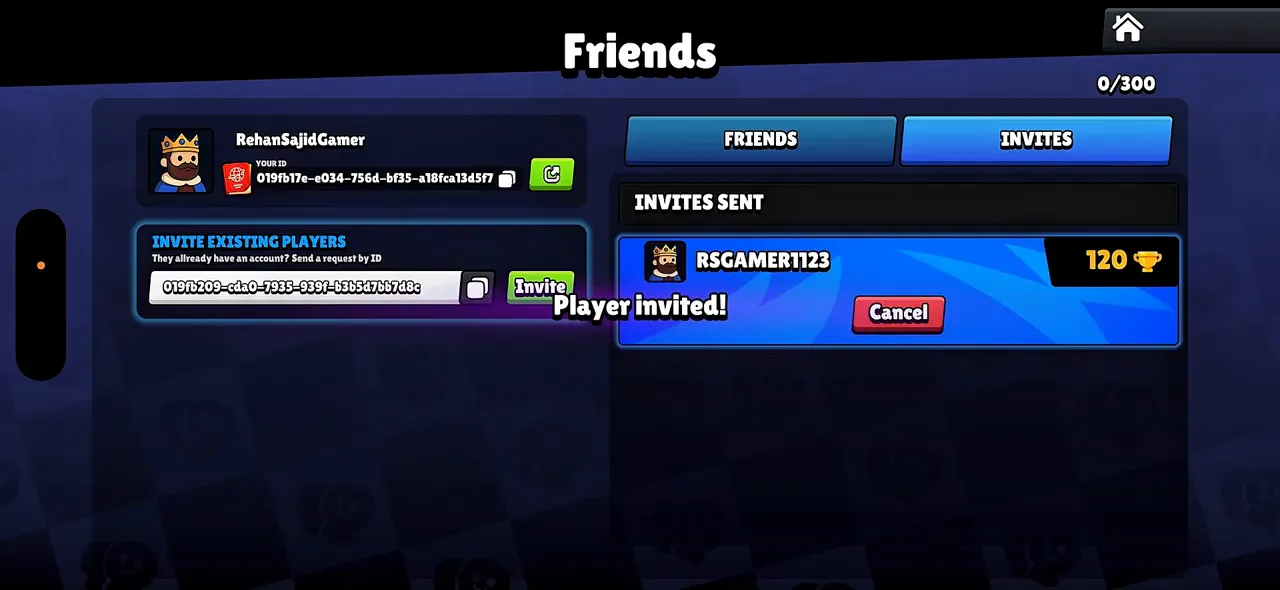
Reach Arena 2, which begins at 100 trophies, and open the friends icon from the home menu. Both people need access to the social screen. The Trophy Road arena reference shows the early milestones if your icon is still locked. A display name identifies someone visually, but the invitation field takes the longer player ID.
- Find the ID beneath your own name in Friends and use its copy button.
- Send the copied string to the person you want to add, or ask them to send theirs.
- Paste their identifier into Invite Existing Players and choose Invite.
- Have the other person open Invites and respond to the friendship request.
- Check that the contact appears in Friends before attempting a battle.
Use the full copied string to avoid confusing similar names. If the field contains spaces from a message, compare it with what your friend copied. Do not paste a store login, email password or a recovery code into this field. For the difference between a nickname and the underlying profile, see player identity and account management.
Send a Friendly Battle
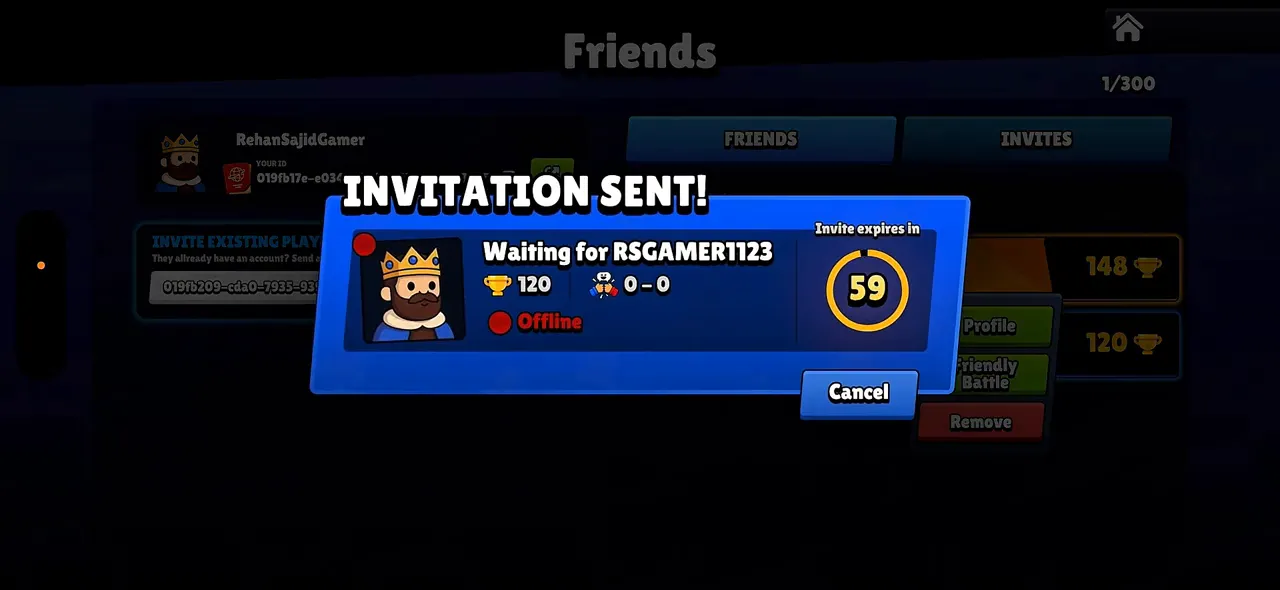
Arrange a time when both players can keep the app open. Find the friend under Online, select their entry and choose Friendly Battle. The sender sees a waiting dialog; the recipient sees a request with Accept and Reject. Pressing the normal Battle button on the home menu is a different route and does not select your friend.
The challenge image shows an expiry countdown and an Offline label for the target. Sending the request therefore does not prove the other person is ready. If you see that label, ask them to enter the game before trying again. A Cancel button lets you leave the waiting dialog without removing the person from your list.
Once accepted, let the battle load before switching to another app. If either side returns to a waiting screen, compare what each player sees rather than immediately creating a new friendship. For repeated disconnections, use the connection and loading checks and keep a note of whether the failure happened before acceptance or during combat.
Read the Social Screen
The same screen holds contact management, match requests and a friends ranking. Use the labels to tell which action is outstanding. A trophy total beside a friend describes their progress; it does not tell you that accepting an invitation will award that many trophies. The table maps each visible control to its immediate job.
| Control | Use | What to expect |
|---|---|---|
| Your ID and copy icon | Share your identifier with the other player. | A copied ID is ready to paste into an invitation. |
| Invite Existing Players | Paste the other person's ID and press Invite. | The request appears under Invites Sent. |
| Friends / Invites | Switch between established contacts and invitations. | A sent request is not yet a battle challenge. |
| Online | Find a friend who is currently available. | Presence helps you coordinate a live match. |
| Friendly Battle | Challenge the selected friend. | The sender gets a waiting window with an expiry timer. |
| Pending Battle Requests | Accept or reject the incoming challenge. | Accept starts the match process; Reject declines it. |
| Leaderboard | Compare trophy progress among friends. | The list is separate from the result of a practice match. |
The tutorial below is about playing with friends in Castle Busters. Use it to recognize the invitation process, then match the visible buttons to your own social screen rather than treating an older menu layout as a required sequence.

Practice Without Trophy Stakes
A friendly duel is a useful place to answer a narrow tactical question. Agree on what you want to test: a lower wall, a protected hero or an opening shot. Keep the rest of the setup stable for the next match. Changing the entire lineup and castle at once makes the result difficult to interpret.
| Question | Practical answer |
|---|---|
| Does the result change trophies? | No. Friendly Battle is practice rather than Trophy Road progression. |
| What can we compare? | Castle layout, shot routes, hero positioning and the result of a planned attack. |
| Should we expect progression rewards? | Use the mode for testing; follow the rewards shown on the relevant ranked or pass track for progression. |
| Does a friend request start combat? | No. Friendship and a timed battle invitation are separate steps. |
| Does the progression rollout prevent a duel? | The progression update allowed battles across its old and new scales, adapting levels proportionally. |
For a layout test, use castle construction choices to pick a feature to change. For an attack test, compare a shot route with the demolition aiming examples. Ask the defender to keep the same arrangement for the rematch so you can observe the effect of your adjustment.
A stronger collection can still affect a practice result. Review the deck role suggestions if you want comparable lineups, and check rarity and upgrade progression before attributing every difference to aim. Friendly Battle provides an opponent you selected, rather than a guarantee that both collections are identical.
Versions and Group Play
The progression overhaul allowed battles between players using its earlier and revised scales, with levels adjusted proportionally for those matchups. Patch 1.21 completed that rollout. Its fixes also added missing feedback for an invitation link used by people who were already friends. If an old link behaves strangely, inspect the current friend list before sending another ID request.
This flow is a duel between selected friends. The social screens in the game show invitations, online contacts and a leaderboard; use that direct route for arranging a match. Organize a group's pairings outside the game rather than planning around clan creation, shared castle ownership or a team queue. For seasonal competitive goals, the Colosseum ladder explanation covers a separate mode.
If a new player is joining your group, let them finish the opening battles first. The starter battle advice helps them reach social access. Agree on a practice goal and a time after that, then repeat the challenge step for a rematch. There is no need to resend the friendship invitation for every duel.
Friend Match Help
When can I add friends in Castle Busters?
Social features open once you reach Arena 2. Before then, continue through the opening Trophy Road battles until the social lock clears. The friend connection uses a player ID, so both people should have their games available when setting it up. Copy the full identifier rather than trying to match only the nickname.
How do I accept a Friendly Battle?
Open Friends and look under Pending Battle Requests, then choose Accept beside the correct challenger. Reject declines the invitation instead. Let the sender know you are ready before they start the countdown, and stay inside the game while the match opens. If the invitation expires, coordinate a fresh challenge rather than sending more friend requests.
Do friendly matches award trophies?
No trophies are gained or lost through Friendly Battle. Use the result to judge a shot or castle design instead of treating it as a way up Trophy Road. The friends leaderboard displays trophy progress from the competitive route. It is not a separate trophy reward for beating someone in a practice duel.
Can we play across different progression versions?
The progression-system transition allowed friends on its old and new scales to fight with proportionally adapted levels. That statement concerns the rollout of that system. Keep both installations updated for a normal session instead of assuming any pair of older releases will connect. When a challenge fails, compare updates and online presence before changing the friendship.
Why does my challenge keep waiting?
The other player still needs to respond before the invitation expires. Check that they are online and looking at incoming battle requests. The waiting window can show an offline status even after a challenge has been sent. Cancel if necessary, agree on a time and send another battle invitation once both players are ready.