
Castle Busters Download
The Castle Busters download is free through Google Play for Android and the App Store for iPhone and iPad, with an official Google Play Games route for Windows computers. Choose the listing for your device below and check compatibility before installing. Online battles require a network connection; optional in-game purchases are separate from the download.

Choose Your Official Download
Use Google Play for Android, the US App Store for Apple devices, or the Castle Busters Windows listing. The publisher is Voodoo. These destinations identify the game itself, avoiding unrelated titles that also feature castles or a similar name. You can also start from the official Castle Busters website.
On a phone or tablet, open the appropriate store link, inspect the publisher and device eligibility, then choose the installation button. Let the store finish before opening the game. An account or compatibility message belongs to the store setup process; it does not mean a premium hero purchase is required. If your aim is simply to try a few matches, leave every optional offer for later.
Store Details And Requirements
Store details checked on November 19, 2026. The App Store download is larger than the older size sometimes quoted for this game. Allow room for installation as well as the listed package, and read the store’s device-specific messages before removing other apps. Android compatibility is best checked on the intended device, where Google Play can evaluate eligibility directly.
| Listing detail | App Store | Google Play |
|---|---|---|
| Publisher | Voodoo | VOODOO |
| Rating | 4.6 out of 5 | 3.5 out of 5 |
| Displayed ratings / reviews | 118K ratings | 229K reviews |
| Download size | 673.9 MB | Check the device listing |
| Minimum mobile OS | iOS 15.0 / iPadOS 15.0 | Compatibility shown for your device |
| Age label on opened listing | 9+ | PEGI 16 |
| Last update | November 10, 2026 | November 10, 2026 |
The Google Play age label above is the label returned by the opened listing; storefronts can show regional rating systems even when the language is English. The description also recommends the game for older children and teens. On Apple devices, use the compatibility section rather than judging by the app icon alone. A supported phone, an iPad and an Apple silicon Mac have separate operating-system checks.
For Castle Busters iPhone installation, the App Store handles downloading and later updates. On iPad, use the same game listing and confirm iPadOS eligibility. The listing also offers Apple silicon Mac compatibility, while marking the app as not verified for macOS. That distinction matters if you want a guaranteed desktop experience: read the label on the actual Mac before treating compatibility as a promise of identical behavior.
Castle Busters Download PC
The Windows PC and laptop method begins on the game’s Google Play PC page. Install Google Play Games, follow its setup prompts and sign into your Google Account. Then install Castle Busters from the catalog. Google’s minimum requirements apply to the platform running the game, so a laptop model name or a large screen alone does not establish compatibility.
| PC component | Platform minimum |
|---|---|
| Windows version | Windows 10, version 2004 or later |
| Storage | SSD with 10 GB available |
| Memory | 8 GB RAM |
| Processor | 4 physical CPU cores |
| Graphics | Intel UHD Graphics 630 or comparable |
| Setup | Administrator account and hardware virtualization enabled |
If setup asks for Windows Hypervisor Platform, follow that prompt and restart when requested. Hardware virtualization may also need enabling in the computer’s firmware settings. Use the manufacturer’s instructions for that part, since the location differs between computers. These are platform setup steps rather than modifications to Castle Busters, and the installer checks the machine before proceeding.
Use the same Google Account across your Android device and PC when setting up Google Play Games. Before making changes to an established installation, review account continuity and recovery. Avoid treating a new store login as proof that an existing game profile has moved successfully; inspect the profile you actually reach before buying anything or deleting an older installation.
The Android clip below walks through installing Castle Busters. It is useful for recognizing the mobile installation flow, while the Windows route above uses Google’s separate PC application.

Common Install Problems
Match the symptom to the store or device first. A stalled download is different from a game that installs successfully and then cannot connect. Try the least disruptive fix before changing accounts or removing the app. The table uses Google Play and Apple’s installation troubleshooting steps, with a separate entry for Windows virtualization setup.
| Problem | Fix |
|---|---|
| Android download stalls | Check Wi-Fi or mobile connectivity, then retry the download. |
| Android storage warning | Open Settings, check Storage, and free space before installing. |
| Play Store will not finish | Close and reopen Play Store; restart the device if necessary. |
| Android system needs updating | Check System update in Settings and follow the update prompts. |
| iPhone download waits | Hold the app icon and choose Prioritize Download. |
| Apple billing or verification prompt | Resolve the previous billing issue and check the payment method, even for a free app. |
| iPhone or iPad update remains stuck | Restart the device, then try downloading or updating again. |
| Windows setup requests virtualization | Follow the Google Play Games prompt to enable Windows Hypervisor Platform, then restart. |
For an Apple billing message, inspect the payment method and any previous purchase problem. That message can affect a free app too. For Android, check storage and system updates before assuming the game itself is broken. If the installation finishes but play still fails, move to connection and launch troubleshooting, where the problem can be described as a launch, loading or match issue.
After The First Launch
Castle Busters Android and Apple players begin with the same core decision: learn the shot and see how damage changes the opponent’s castle. The opening battles guide helps you orient yourself after loading. You do not need to purchase a shop pack to understand the starting roster. Read Wrecker’s attack profile and Scout’s projectile spread when deciding what each starter contributes.

After a win, the payout panel gives you a chance to review what happened before continuing. The video-marked Double rewards control is a different choice from Continue. For a fuller explanation of those reward routes, read earned rewards and promo-code status. Learn the normal claim flow first, then decide whether optional videos fit how you want to play.
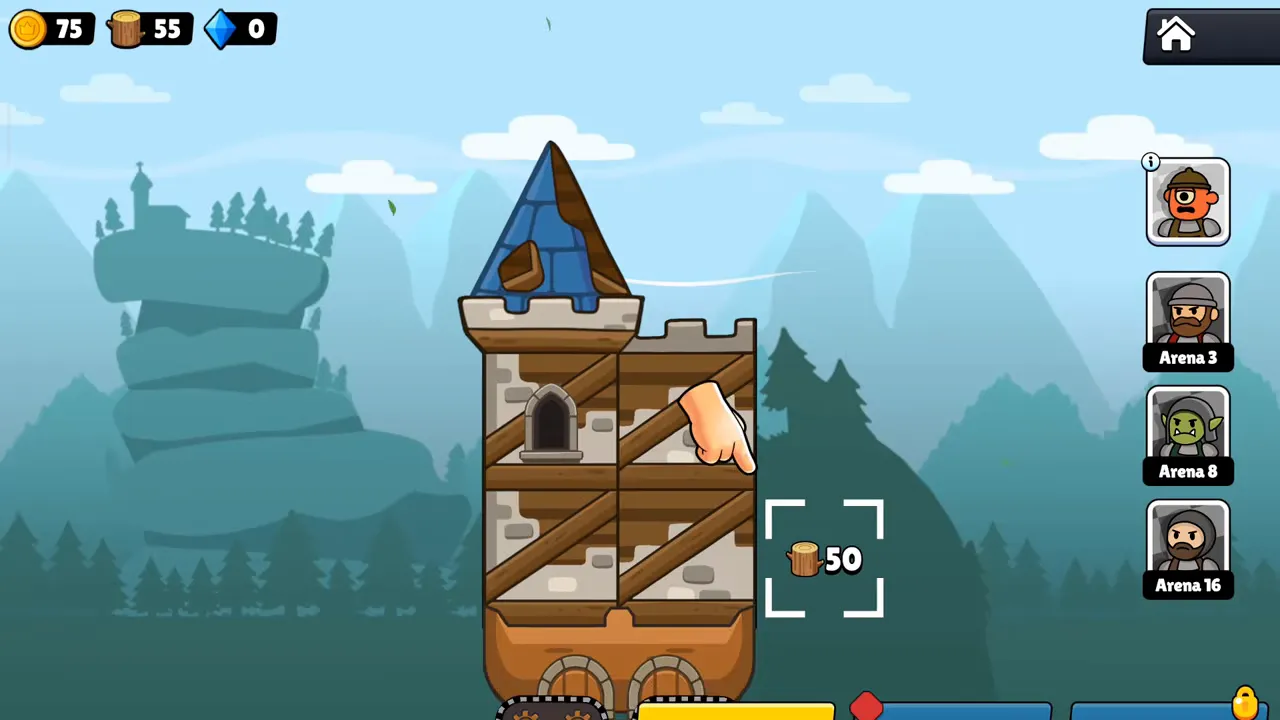
The building screen is where layout begins to matter. Read a cost before confirming it and note that locked portraits point toward later progression. The building and foundation guide covers structural choices, while the Trophy Road unlock guide explains why some heroes are unavailable at the start. Installation gets you to these menus; it does not unlock the entire collection.
Platforms And Modified Apps
There is no official Castle Busters Nintendo Switch download or browser-play edition among these supported routes. To play online, install the game through an appropriate official listing. A webpage featuring a Play button is not automatically a browser version, and another game with a similar castle-themed title should not be treated as a port of this one. If you want a similar siege or artillery game on a console or another store, see our list of games like Castle Busters.
Once the game runs, keep purchases and setup separate. The purchase catalog explanation covers optional offers, and the patch timeline explains changes you may notice after updating. If you want help building a team, visit team composition by progression after trying the starters, when the role of each slot is easier to judge.
Installation Questions Answered
Is the Castle Busters download free?
Downloading Castle Busters costs nothing on its official mobile listings. Optional purchases appear inside the game, so installing it does not require choosing a Gem pack or pass. Check the publisher name before installing, then review any later purchase prompt separately. A free download also does not remove the need for an internet connection during play.
Can I install Castle Busters on a Windows laptop?
Yes, the official Windows route uses Google Play Games on PC. A laptop still has to satisfy its hardware and Windows requirements, including storage and virtualization, just like a desktop. Open the game’s Google Play PC listing to begin; do not assume a mobile download can be opened directly as a Windows program.
Can Castle Busters run on a Mac?
The App Store lists compatibility with Apple silicon Macs meeting its macOS requirement. Check the listing on your own Mac before installing, since it also labels the app as not verified for macOS. That compatibility statement is different from a dedicated desktop edition and should not be read as support for an older Intel Mac.
Is there a Nintendo Switch or browser edition?
Castle Busters has no official Nintendo Switch or browser edition in the download routes presented here. Use Android, Apple’s supported devices or the Google Play Games Windows option. The official website introduces the game and points toward installation; opening that site in a browser does not launch a playable match inside the webpage.
Why does an iPhone ask for payment details for a free app?
Apple may require a valid payment method even when the requested app is free. A previous billing issue can also interrupt a download or update. Resolve the store account message before retrying instead of buying a Castle Busters offer to unlock installation. The download itself remains separate from the optional transactions offered once the game opens.
Should I reinstall if the first battle will not load?
Check the connection and restart the game before deciding to reinstall. Castle Busters needs online access, so a completed installation does not establish that a match can connect. For a continuing problem, record where loading stops and use the troubleshooting page or in-game support. Avoid deleting an existing installation before checking how your account progress is protected.