
Castle Busters Account
Your Castle Busters account should be identified by its player ID before you try to link, replace or delete it. Keep the old phone available during a move, check the profile that opens on the new device and ask support for platform-specific instructions. Game Center support on iPhone should not be treated as a guarantee of Android transfer or automatic save restoration.

Secure the Existing Profile
Begin while the account still opens. Copy its ID, capture the home menu and record what you own. A recognizable name is useful, but the long identifier is the better reference when discussing a specific profile. Keep purchase receipts outside the app as well. That preparation is especially valuable when the old phone will be traded in or wiped.
| What to save | Where to look | Why it helps |
|---|---|---|
| Player ID | Friends, below your name | Identifies the profile for invitations and support reports. |
| Display name | Profile panel on the home menu | Helps recognize the profile, but is not a replacement for its ID. |
| Arena and trophies | Progress bar above the castle | Gives a quick comparison after opening the game elsewhere. |
| Units and castle | Collection and building screens | Shows whether the expected collection and construction are present. |
| Purchase receipts | Your store purchase history | Provides a transaction reference in a private recovery conversation. |
The social area becomes available at Arena 2, whose entry threshold is 100 trophies. If it remains locked, use the early battle walkthrough to reach that point and the arena progression table to understand the threshold. Keep account preparation separate from decisions about spending or upgrading.
Link Account and Login
On an Apple device, check the Game Center identity you intend to use and then inspect the account controls visible in Castle Busters Settings. The iPhone app supports Game Center, but the presence of that feature is only a starting point. Confirm any linking operation through the game itself and verify the profile afterward. A greeting or an achievement is not a complete recovery test.
On Android, inspect the Google Play Games identity and any sign-in option the app offers. Follow a Google Play Games linking control only if it appears and clearly describes the operation. Do not infer that a Google Play purchase login also stores every part of your game progress. If the available controls do not explain saving, ask the team through Settings before replacing the device.
A player ID also serves the social system. You can copy it to add another person using the friend invitation instructions. Giving someone that ID is different from giving them permission to log into your store account. Never send an Apple or Google password, a login code or a recovery code to another player.
Move Between Phones
Use a move as a verification exercise: keep the source device intact, open the intended destination account and compare the result. Check the ID before accepting a familiar-looking name as proof. The table gives a cautious order for each route without assuming that the same login system handles both mobile platforms.
| Move | Prepare | Verify |
|---|---|---|
| iPhone to another Apple device | Use the intended Apple and Game Center identities. | Compare the player ID, collection and castle before retiring the old phone. |
| Android to another Android phone | Keep the original installation accessible and inspect available account options. | Ask support about the specific save route before relying on a store sign-in. |
| iOS to Android | Contact the game team with both devices and the existing player ID. | Get instructions for that profile; a Game Center login is not an Android login. |
| Android to iOS | Request transfer guidance while you can still open the Android profile. | Keep receipts and confirm purchases separately from battle progress. |
For an iOS-to-Android move, explain the direction explicitly in your request. Describe your access to the old profile and say if the destination already has a new profile. Ask how earned progress and paid items will be handled before authorizing changes. Download through the official device listings so the destination uses the intended game.
The account-change video provides a visual walkthrough of profile controls. Use the labels currently displayed on your own device when following it, and stop before any action that would replace a save you still need.

Edit Your Display Name
Edit Profile appears beside the player panel on the home menu. Use that entry to inspect the available profile edits. Changing how a name appears is different from changing which account owns the collection. A new display name should therefore not be used as evidence that a phone transfer or account switch succeeded.
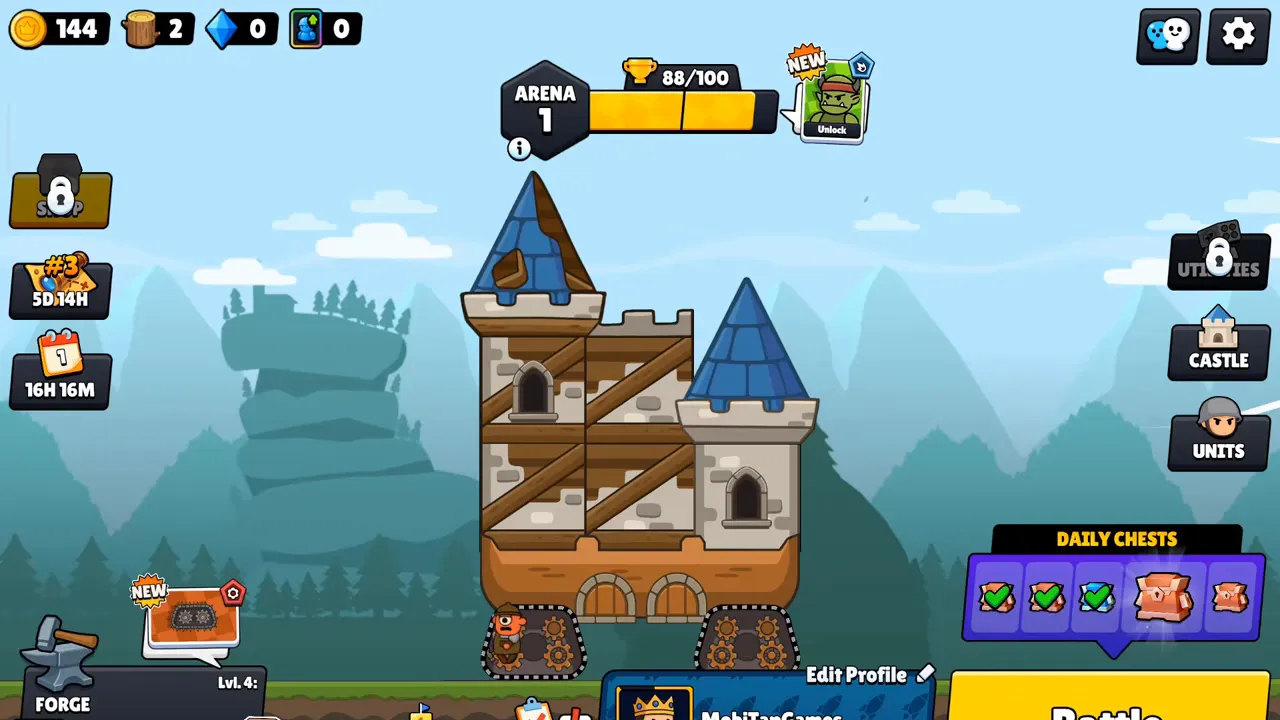
When comparing profiles, look beyond the arena badge. Inspect the owned hero collection, the castle and the Forge Pass position. The building overview helps identify construction differences, while unit upgrade rules explain what changing level displays mean. Save screenshots before attempting another switch.
Progress Changes After Patches
The progression update carried existing cards, castle progress and Forge Pass progress into a revised system. Patch 1.21 completed its rollout. Different numbers after that transition do not automatically mean you have opened a different account. Rarity now affects starting levels: Common starts at 1; Rare starts at 5; Epic starts at 10; Legendary starts at 25.
Compare ownership before concluding that a save disappeared. A changed card counter or a rescaled unit level belongs in a different report from missing heroes or a different player ID. Check the progression update summary, then describe precisely which items are absent if your collection still fails to match.
Reset or Delete Data
Tell support if your goal is to start again, recover a profile or remove account data. Those requests have different consequences. A fresh-start request should mention purchases and explain if continued access to the older profile matters. Do not try to force the outcome by repeatedly reinstalling or changing store identities.
For deletion, use the support contact in Settings or send a privacy request naming Castle Busters to [email protected]. Include enough information to identify the intended profile and respond to any verification request privately. Deletion can affect access to progress and purchases; some records may remain where retention is legally required. Removing the app from a phone is a separate action.
If access is already lost, contact [email protected] with the saved ID, previous display name, devices used and a description of the missing collection. Provide receipts only through that private conversation. For a game that closes before you can inspect the account, follow the launch-failure checks first while preserving the installation.
Profile Management Answers
Where do I find my Castle Busters ID?
Your ID appears beneath your name on the Friends screen. Use the copy control beside that string and keep it somewhere accessible outside the game. Social access opens at Arena 2. Before reaching it, preserve screenshots of your home profile and describe the missing ID to support rather than substituting a display name.
Does Game Center prove my progress is safely linked?
Game Center support alone does not prove that a particular save will restore. Check which identity is active and which account options the game actually displays. Before replacing your iPhone, compare the profile that opens on the destination device. Retain the original phone until its ID, units and castle match the account you meant to keep.
How do I move Castle Busters from iOS to Android?
Ask support for instructions specific to your existing profile before changing platforms. Include your player ID, the original device and the destination device. Preserve access on the iPhone while the request is handled. Treat progress and purchased content as separate items to check; signing into Google Play does not itself sign into an Apple identity.
Can I reset the game by uninstalling it?
Do not use uninstalling as a dependable account reset. Removing an app and requesting deletion of an account are separate actions. If you want a fresh start, explain that goal to support and ask about its effect on purchases and recovery. Keep the existing ID until you understand which profile the next launch will open.
How do I request account deletion?
Contact the game through Settings for an account request, or send a privacy request to [email protected]. Name Castle Busters and identify the profile you intend to delete. State that you want account data removed rather than help recovering a save. The publisher may need verification, and some records can be retained where legal obligations apply.
Why did my unit levels change after an update?
The progression overhaul rescaled existing levels while carrying earned power and collection progress forward. A smaller level number alone is therefore different from an empty account. Compare the owned units, castle and Forge Pass as well as the ID. If those do not match what you had, document the differences and request a recovery investigation.